Zoomed out? Tired of Teams? Sick of meeting on Meet?
At this point, you probably spend more time with your students virtually than in person. Add in staff meetings, webinars, and the majority of your work day is now on video conferencing software rather than face to face.
So now comes the bigger question... Are you using the camera and microphone built into your computer or did you go out and try to buy a camera and headset only to find out they're sold out everywhere. Even Amazon is having trouble stocking the popular/recommended products. Having the right equipment won't make you any less tired from web conferencing but it will help improve the experience for you and your students.
Whatever hardware you choose for your video conferencing software, make sure you practice using it and get comfortable before working with your students. Practice a few times to make sure you connect the hardware correctly and know where in the software settings to change it. Good luck!
Part 1: Camera
After weeks of using my computer's camera, I realized how annoying it was to position the computer where I could have a decent camera angle AND still use my computer. I finally decided to spend some money on an external camera, but at that point they were already sold out everywhere. So I looked at the features of the sold out camera and decided to try and find one that listed similar features.
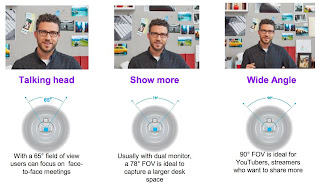
When I was doing research, I learned that most cameras now advertise 1080p but it's really the FPS (frames per second) that matter. 30FPS is the lowest you want because anything lower will look like a flipbook with lag in the motion. 60FPS is what most streamers that do video games and such look for but it's probably overkill for a teacher using web conferencing so don't panic if you only see 30FPS advertised. The final thing you want to look at is field of view. There isn't really a "best" in terms of field of view, but just know it's the angle that the camera can see.
The camera I originally bought
cost $30 on Amazon during a lightning sale. I decided to try it because worst case, I'd return it for a refund. The image quality was decent but the sound was awful so I did in fact end up returning it.
Prior to publishing this post, I magically found one of those recommended cameras in stock at Target and bought it. This
Logitech C920 is sold out everywhere, including Logitech's website. On eBay, it's going for around $150 due to supply and demand so I was shocked to find it in stock for under $70. Check your local Targets, Walmarts, etc. because people often forget about those stores for electronics and you might get lucky too.
Part 2: Microphone and Speakers
Although you may be tempted to buy a fancy looking microphone, I actually recommend against this for video conferencing. If you choose to go the microphone route, you'll still need earbuds or headphones for your speaker. Otherwise, you'll get feedback from the microphone "hearing" the speakers. Some of the really fancy microphones will have built in features to reduce that feedback but you will end up paying more. The easiest way to prevent the feedback is to use a headset where the input and output for sound are in the same device.
One recommendation that I've seen floating around many teacher sites lately is to look at buying a gaming headset. This suggestion has a few benefits for teachers.
- Gamers tend to wear them for long periods of time so they're designed for comfort.
- They have good sound quality since gamers tend to be picky (in a good way).
- They seem to have plenty in stock right now.
While you may be considering a bluetooth connection so you are not tethered to your computer, remember that if you will be on webinars for long periods of time, some bluetooth devices won't have a long enough battery on a single charge. Wired headsets do not require charging to continuously work. Although some computers are short on USB ports so know your device before deciding on a sound solution.
Part 3: Displays
It doesn't matter which video conferencing software you're using. at some point, you're going to have so many windows open on your computer that you can't see everything. It's very easy to attach an extra display to your computer and expand what you are looking at. However, don't go out and buy a dedicated computer monitor. All you need is an HDMI cable (and perhaps a dongle depending on your computer). That's right, an HDMI cable. Plug your computer into a television, switch the TV's input, and volia. You are ready to use your TV as a temporary display.
 |
Screen shot Windows 10
|
Depending on your computer the method will be different, but all computers have display options so you can either mirror or expand your display. For the purpose of display real estate, you'll want to expand your display. This will allow you to act as two screens are one large screen. You can drag and rearrange windows to the different screens so that everything is visible.